transcriber-platform
Transcriber Platform
Self-hosted AI transcription, live speech-to-text, and reusable LLM workflows for individuals and teams.
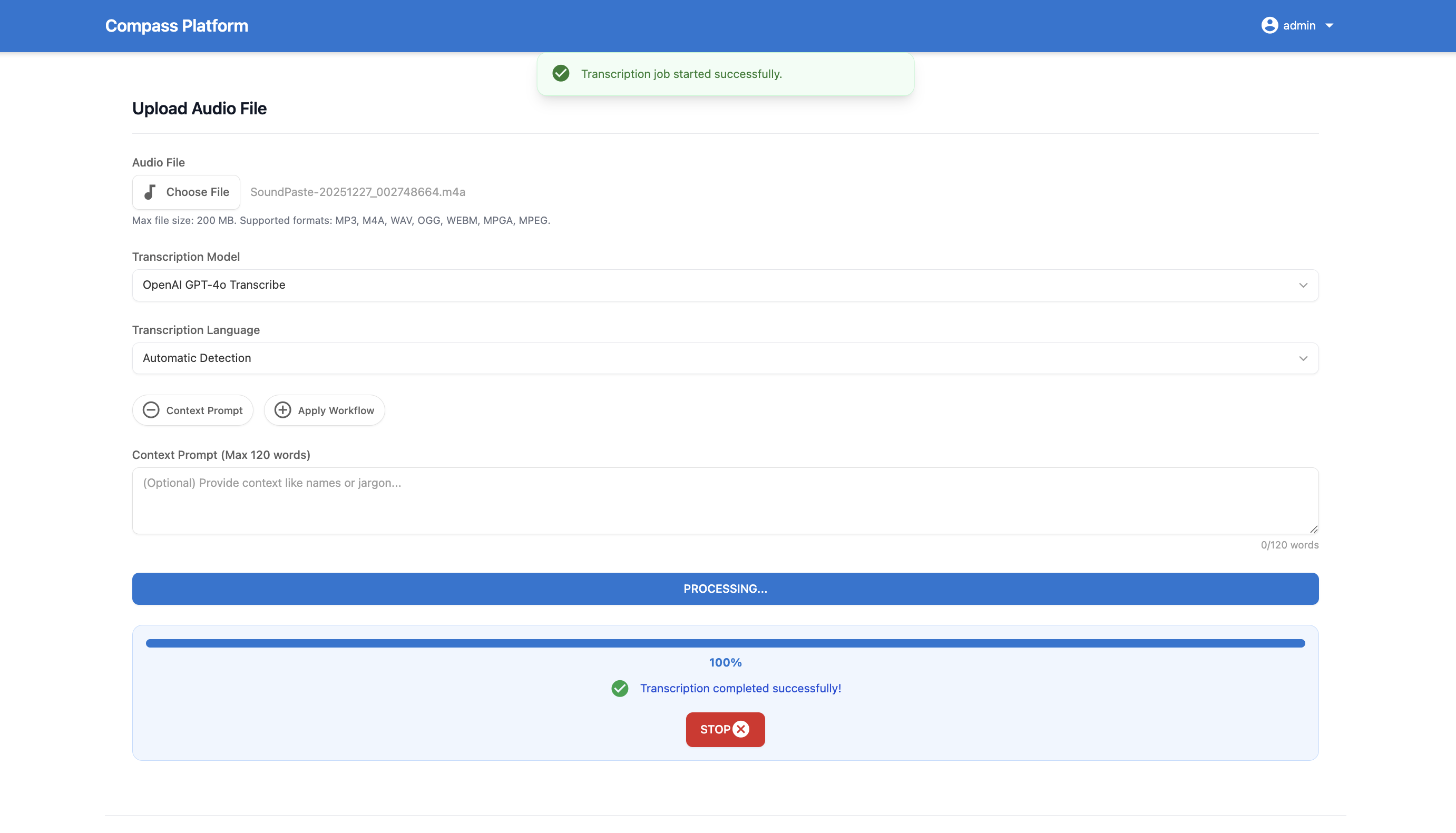
Transcriber Platform turns uploaded audio or a live microphone feed into searchable transcription history. It combines a clean web app, a bearer-token REST API, role-based access control, per-user model keys, usage quotas, and cost analytics—while keeping deployment and data under your control.



Why Transcriber Platform?
- Batch and live transcription: Upload audio files or transcribe a microphone in real time.
- Bring your own models and keys: Use OpenAI, AssemblyAI, Google Gemini, and OpenRouter without locking the app to a hard-coded model list.
- Turn transcripts into useful output: Generate titles and run reusable prompts for summaries, action items, notes, or any custom workflow.
- Operate it for a team: Add authentication, RBAC, per-user keys, quotas, retention policies, pricing, and admin analytics.
- Automate it: Submit and poll transcription jobs through a public REST API.
- Self-host it: Run the Flask and MySQL stack with Docker Compose or deploy the published Docker image.
Feature overview
Transcription
| Capability | What it supports |
|---|---|
| File transcription | OpenAI, AssemblyAI, Google Gemini, and OpenRouter models |
| Live transcription | OpenAI over WebRTC, Google Gemini over WebSocket, and OpenRouter using short audio chunks with streamed responses |
| Speaker diarization | Speaker labels on supported AssemblyAI jobs |
| Context prompting | Names, acronyms, and domain vocabulary where supported by the selected provider |
| Language handling | Manual language selection, automatic detection, and persisted detected-language metadata |
| Large files | Uploads up to 200 MB, with automatic splitting when a file exceeds the selected model or provider limit |
| Job lifecycle | Live progress, cancellation, recovery of abandoned jobs, and incomplete-chunk warnings |
Live sessions can run for up to 120 minutes. The app reserves live minutes against role quotas, automatically resumes Gemini connections when possible, and saves the finished live transcript to normal history. Provider API keys remain server-side; Gemini uses a constrained, short-lived token for the browser connection.
Models, API keys, and AI workflows
- Models are registered dynamically when an admin or permitted user saves a provider API key and model name in Manage API Keys.
- A saved model can be marked for
transcription,live,llm, or multiple purposes. Model lists refresh immediately after a key is saved or removed. - Admins can rename registered models in one place, Admin → Models; that display name is then used consistently in selectors, history, pricing, logs, and analytics.
- Users can choose separate defaults for file transcription, live transcription, title generation, and workflows.
- Reusable workflows can summarize transcripts, extract decisions or action items, create notes, or run any custom prompt.
- A workflow can be selected before upload, or run later from history. Workflow results can be edited or deleted.
- Automatic title generation uses the selected model and recovers cleanly from interrupted operations.
History and user experience
- Search, pin, copy, download, delete, restore, or clear transcriptions.
- View provider/model, duration, language, timestamps, workflow output, and processing warnings.
- Use the responsive interface on desktop or mobile.
- Choose English, Spanish, French, or Dutch for the interface.
- Set personal defaults for content language, models, and automatic title generation.
Team and administration
Transcriber Platform has two deployment modes:
single— a personal, no-login experience backed by global provider keys.multi— user registration and login, Google Sign-In, password resets, personal provider keys, and role-based permissions.
The admin panel includes:
- User and role management.
- Provider and feature permissions, including API key management, public API access, downloads, workflows, context prompts, diarization, and live transcription.
- Daily, weekly, and monthly limits for transcription minutes, live minutes, workflow runs, and cost.
- History item and retention limits.
- Default models per role for file transcription, live transcription, titles, and workflows.
- Transcription, workflow, language, model, cost, performance, user, and error analytics.
- Per-model pricing for transcription, title generation, and workflows.
- System-wide workflow templates scoped to one language or all languages.
Quick start with Docker Compose
Prerequisites
- Docker
- Docker Compose
- At least one API key for a provider you intend to use
1. Clone and configure
git clone https://github.com/arnoulddw/transcriber-platform.git
cd transcriber-platform
cp .env.example .env
Generate a strong application secret:
openssl rand -hex 32
Edit .env and replace the placeholder values. At minimum, set:
SECRET_KEY=<generated-secret>
MYSQL_USER=transcriber_user
MYSQL_PASSWORD=<strong-database-password>
MYSQL_DB=transcriber_db
MYSQL_ROOT_PASSWORD=<strong-root-password>
ADMIN_USERNAME=admin
ADMIN_PASSWORD=<strong-admin-password>
Add the global provider keys you need, such as OPENAI_API_KEY, ASSEMBLYAI_API_KEY, GEMINI_API_KEY, or OPENROUTER_API_KEY. In multi mode, permitted users can instead save model-specific keys in the UI.
2. Start the stack
docker compose up -d --build
Open http://localhost:5004. The application initializes the database, migrations, default roles, languages, and initial admin account on first startup. Compose also starts a durable transcriber-worker for transcription, workflow, and title jobs, plus a transcriber-cleanup process that runs retention cleanup every six hours.
When running the published image as a single container, its default command starts both Gunicorn and a background worker. The worker must share the application’s database and uploads directory. Set START_EMBEDDED_WORKER=0 only if a separately supervised worker runs flask worker against those same resources.
Useful operational commands:
docker compose ps
docker compose logs -f transcriber-platform
docker compose down
The cleanup process can be run manually once when diagnosing retention behavior:
docker compose run --rm transcriber-cleanup flask cleanup-once
MySQL data is kept in the mysql_data Docker volume. Uploaded temporary files, logs, and runtime markers are mounted from the repository directory.
Configure providers and models
The application has four built-in provider integrations, but it does not assume a permanent list of model names. This lets new provider models work without waiting for a release.
| Provider | File transcription | Live transcription | LLM workflows/titles | Notes |
|---|---|---|---|---|
| OpenAI | Yes | WebRTC | Yes | Examples include whisper-1, gpt-4o-transcribe, and gpt-transcribe |
| AssemblyAI | Yes | — | — | Supports optional speaker diarization |
| Google Gemini | Yes | WebSocket | Yes | Save the exact Gemini model name, such as gemini-3.5-transcribe |
| OpenRouter | Yes | Chunked streaming | Yes | Save the full vendor/model slug, such as openai/gpt-transcribe |
In multi mode:
- Open Manage API Keys.
- Choose a provider and enter its API key.
- Enter the exact provider model name.
- Select one or more purposes: file transcription, live transcription, or LLM use.
- Save the key. The new model becomes available immediately in the relevant selectors.
If a role allows personal API key management, the application uses that user’s model-specific key. Otherwise it can fall back to an administrator or environment-level provider key. Roles still determine which providers and features a user may access.
Live transcription configuration
The default live model is gpt-live-transcribe. Configure additional live models with a comma-separated list:
LIVE_TRANSCRIPTION_MODEL=gpt-live-transcribe
LIVE_TRANSCRIPTION_MODELS=gpt-live-transcribe,openai/gpt-transcribe
LIVE_TRANSCRIPTION_PROVIDER_OPENAI_GPT_TRANSCRIBE=openrouter
Slashless model names default to OpenAI; vendor/model slugs default to OpenRouter. A Gemini model saved with the live purpose is routed to Gemini automatically. Use OPENROUTER_LIVE_TRANSCRIPTION_MODELS to allow a newly released OpenRouter STT model that is not yet in the built-in compatibility list.
Configuration reference
Start from .env.example. These are the settings most deployments need to understand:
| Variable | Purpose | Default |
|---|---|---|
DEPLOYMENT_MODE |
single for personal/no-login use or multi for accounts and RBAC |
multi |
APP_PORT |
Host port exposed by Docker Compose | 5004 |
TZ |
Time zone used for quota periods and display | UTC |
TRANSCRIPTION_PROVIDERS |
Enabled built-in provider integrations | assemblyai,openai,gemini,openrouter |
DEFAULT_TRANSCRIPTION_PROVIDER |
Fallback provider when no catalog default is available | openai |
DEFAULT_LLM_PROVIDER |
Fallback provider for direct LLM operations (LLM_PROVIDER remains a legacy alias) |
GEMINI |
DEFAULT_LANGUAGE |
Default content language or auto |
auto |
SUPPORTED_LANGUAGE_CODES |
Languages seeded into the active language catalog | en,nl,fr,es |
TRANSCRIPTION_MAX_CONCURRENT_JOBS |
System-wide jobs allowed to process simultaneously | 2 |
BACKGROUND_WORKER_CONCURRENCY |
Concurrent jobs in the dedicated worker | 2 |
BACKGROUND_JOB_MAX_ATTEMPTS |
Maximum attempts for a durable background job | 3 |
BACKGROUND_JOB_STALE_SECONDS |
Age at which an abandoned worker claim is recovered | 300 |
TRANSCRIPTION_WORKERS |
Parallel workers used for a split transcription | 4 |
WORKFLOW_MAX_OUTPUT_TOKENS |
Maximum generated tokens for a workflow result | 1024 |
WORKFLOW_RATE_LIMIT |
Per-user workflow endpoint limit | 10 per hour |
PHYSICAL_DELETION_DAYS |
Delay before soft-deleted records are purged | 120 |
GOOGLE_CLIENT_ID |
Enables Google Sign-In in multi mode |
unset |
MAIL_* |
SMTP settings used for password reset email | unset |
RECAPTCHA_V3_* |
Optional reCAPTCHA v3 or Enterprise login protection | unset |
Additional settings in .env.example cover MySQL, title/workflow defaults, OpenRouter, live models, rate limiting, upload cleanup, logging, OAuth, email, and transcription queue behavior.
Production note: use strong unique values for
SECRET_KEY,ADMIN_PASSWORD,MYSQL_PASSWORD, andMYSQL_ROOT_PASSWORD; terminate TLS in front of the app; and keep.envout of version control.
Using the app
Transcribe a file
- Choose a registered transcription model.
- Select the spoken language or leave automatic detection enabled.
- Optionally add names, acronyms, or subject vocabulary as context.
- Optionally enable AssemblyAI speaker diarization.
- Optionally select a workflow to run after transcription.
- Upload an
mp3,m4a,wav,ogg,webm,mpga, ormpegfile and select Transcribe. - Follow progress in the page; completed output appears in history.
Transcribe live audio
Open Live transcription, choose a microphone, language, and live model, then select Start. Interim text appears while you speak. Select Stop and save to store the completed transcript in history, where it behaves like any uploaded transcription.
Live microphone transcription requires browser microphone permission and a browser with the transport capabilities needed by the selected provider.
Create and run workflows
Open Manage Workflow Prompts to save reusable prompts. Workflows can be run from a completed transcript or pre-applied before an upload. Admins can publish templates for a specific transcription language or for all languages.
Public transcription API
Users whose role allows public API access can create and revoke named bearer tokens from Manage API Keys → Public API Access. API jobs use the user’s default model and language, enforce the same permissions and quotas as the web UI, and appear in normal history.
Submit audio
curl -X POST https://your-domain.example.com/api/v1/transcribe \
  -H "Authorization: Bearer <YOUR_API_KEY>" \
  -F "audio_file=@/path/to/audio.wav"
A successful request returns HTTP 202:
{
  "job_id": "<uuid>",
  "message": "Transcription job started successfully.",
  "audio_length_minutes": 3.42
}
Poll status and retrieve the result
curl https://your-domain.example.com/api/v1/transcribe/<job_id> \
  -H "Authorization: Bearer <YOUR_API_KEY>"
The response includes a machine-readable status. A finished job includes result.transcription_text, detected language, filename, provider, duration, and creation time. Failed or cancelled jobs include error_message. The alias /api/v1/transcriptions/<job_id> is also supported.
The default rate limits are 10 submissions per hour and 120 status requests per hour per API key.
Alternative installation methods
Published Docker image
Create .env and provide an accessible MySQL database, then run:
docker pull arnoulddw/transcriber-platform:latest
docker run -d \
  --name transcriber-platform \
  --env-file .env \
  -p 5004:5004 \
  arnoulddw/transcriber-platform:latest
Local development
Python 3.11, Node.js 18, MySQL 8, and FFmpeg match the container and CI environments.
python3.11 -m venv venv
source venv/bin/activate
pip install -r requirements-dev.txt
npm ci
export FLASK_APP=app
flask bootstrap
npm run build:css:prod
flask run --host=0.0.0.0 --port=5004
Set the MySQL variables in .env for your local database and use MYSQL_HOST=localhost. For CSS development, run npm run build:css:dev in a second terminal.
Development and testing
The startup bootstrap handles schema creation, migrations, default roles, language seeding, model-catalog repair, initial admin creation, and recovery of interrupted work. Manual CLI commands are also available:
export FLASK_APP=app
flask init-db
flask create-roles
flask create-admin
flask db-migrate
flask cleanup-once
flask bootstrap
flask cleanup-loop is the long-running command used by the Compose cleanup service. If you deploy the image outside Compose, run that command as a separate supervised process (or schedule flask cleanup-once); cleanup is deliberately not started inside the web application factory.
Run JavaScript tests:
npm ci
npm run test:js
Run the Python suite against the dedicated MySQL test container:
docker compose -f tests/docker-compose.test.yml up -d

env MYSQL_HOST=127.0.0.1 MYSQL_PORT=3308 MYSQL_USER=test MYSQL_PASSWORD=test MYSQL_DB=test_db \
    MYSQL_TEST_HOST=127.0.0.1 MYSQL_TEST_PORT=3308 MYSQL_TEST_USER=test MYSQL_TEST_PASSWORD=test MYSQL_TEST_DB=test_db \
    venv/bin/pytest -q

docker compose -f tests/docker-compose.test.yml down
See tests/README.md for the container-based test workflow and fixture conventions.
Troubleshooting
No transcription models appear
In multi mode, save a provider key together with an exact model name and the transcription purpose. Confirm the user’s role allows that provider. If personal key management is disabled, configure an administrator or global provider key and role default.
Live transcription will not start
- Allow microphone access in the browser.
- Confirm the model was saved with the
livepurpose and the role permits its provider. - Check that the user has remaining daily, weekly, and monthly live minutes.
- For a new OpenRouter STT slug, add it to
OPENROUTER_LIVE_TRANSCRIPTION_MODELS. - Review
docker compose logs -f transcriber-platformfor upstream or transport errors.
MySQL connection fails
With Docker Compose, use MYSQL_HOST=mysql. For a host-installed database, use MYSQL_HOST=localhost and verify the port, database, user, and password. Check service health with docker compose ps and database logs with docker compose logs mysql.
Google Sign-In or password reset fails
Set GOOGLE_CLIENT_ID and configure the matching authorized origin for Google Sign-In. Password reset requires valid MAIL_* SMTP settings. If reCAPTCHA is enabled, verify the site/secret key pair and allowed domain.
The app port is already in use
Change APP_PORT in .env, then recreate the application service with docker compose up -d.
License
Transcriber Platform is available under the MIT License.